How to Choose Your Google Business Profile Categories
Ten minutes of work, one of the strongest levers you personally control on Google Maps, and a claim everyone repeats without ever telling you where it came from.

- The claim that primary category is the number one local ranking factor comes from a survey of 47 local search experts scoring 187 factors, not from a measured weight inside Google.
- It is still worth acting on, because category is the only factor at the top of that list you can change honestly in four minutes.
- Map your services by revenue against the category list before you open the picker. The category that describes your company and the category that describes your best job are usually different.
- Google says use as few categories as possible. Practitioners who run tests say use all ten. Both are right about different slots, and relevance is the actual rule.
- Categories rank first for Google Maps and thirty-fourth for AI search visibility in the same expert survey. This is a Maps lever, not an AI lever.
The number one ranking factor claim, and where it actually comes from
Make your primary category the exact match for the single service that earns you the most money. Use the other nine slots for every remaining service that has a real name on Google's list. Do that revenue mapping before you open the category picker, because the category that describes your company and the category that describes your best job are usually not the same one.
Every other guide on this topic tells you the primary category is the number one local ranking factor. Almost none of them tell you where that came from.
It comes from Whitespark's Local Search Ranking Factors report, and the method is printed on the page: "47 of the best and the brightest local search experts are invited to complete a comprehensive 2-hour survey, weighing and scoring 187 factors and answering open-ended questions about what they see driving local search rankings today." Primary category finished first with a score of 227. Proximity of your address to the searcher came second at 225. Keywords in your business name came third at 223.
Those are summed opinion scores from a poll of practitioners. They are not measured weights lifted out of Google's ranking system, and the person who runs the survey says so on the page itself.
None of the experts have special access to the internal workings of Google's local search algorithm.
So treat 227 as the strongest available prior, not as a law of physics. What makes category worth an hour of your time is the company it keeps at the top of that list. Proximity is fixed by where your building sits. Keywords in your business name are a suspension risk and we are not going to tell you to stuff them. Category is the only factor near the top that you can change honestly, yourself, in about four minutes.
BrightLocal's guide, written by a Google Business Profile Platinum Product Expert, states the industry consensus in one sentence.
Your primary category is considered to be the single most important local ranking factor for a business in the local pack.
Hold both ideas at once. The evidence is expert belief rather than measurement, and expert belief still beats the four second guess you made at signup years ago.
Map your revenue against the list before you touch anything
This is the step that separates a real category decision from a coin flip, and no competing article asks you to do it. Do not start in Google's picker. Start on paper.
Write down every service you actually sell, ordered by the revenue it produced last year. Not the services on your truck wrap. The ones that paid the bills.
Then open your profile, click into the business category field, and type each service in. Mark every line one of three ways.
- Exact. A category exists with essentially that name.
- Partial. A broader category covers it but blurs it into a much bigger fight.
- None. Google simply has no name for it. The list is large and it still does not cover everything.
BrightLocal's category guide puts the size of the list at "There are around 4000 GBP categories, though these change all the time," and that instability is real. Sterling Sky maintains a public changelog of category additions and removals with entries in most months, including five new categories added in July 2026 alone. A category that did not exist for your niche two years ago may exist now.
Now look at your grid. The pattern we see on contractor profiles is usually the same. The highest revenue line has an exact match nobody ever selected, and the slot currently holding the primary describes the company rather than the work.
| What you sell | Share of last year's revenue | Category match | What to do with it |
|---|---|---|---|
| Your biggest service line | 40 to 60 percent | Exact | Primary category |
| Second service line | 20 to 30 percent | Exact | First secondary you add |
| Specialty with real margin | 10 to 15 percent | Exact | Secondary, plus its own page on your site |
| Work the list has no name for | any | None | Not a category. Put it in Services and build a page |
| A job you take but never market | under 5 percent | Partial | Leave the slot empty |
Joy Hawkins uses the cleanest version of this: if you took Google's advice and only added "dentist," you would be missing out on the potential to rank better for "teeth whitening" keywords. Whitening is the higher margin job. Dentist is the company. Those are two different rows on the grid, and only one of them belongs in the primary slot.
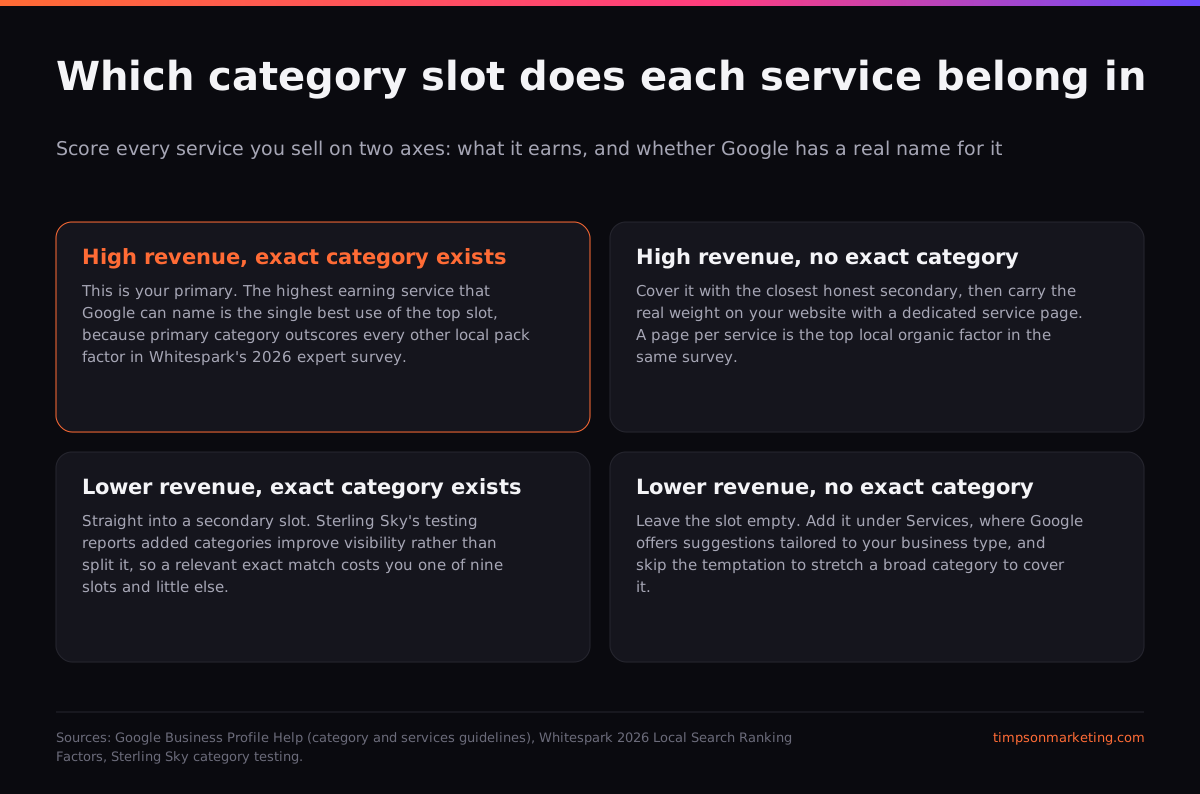
The four tests for the primary slot
Run them in this order. The first test that produces a single answer wins, and you stop.
Revenue first
Of the services with an exact category match, which produced the most revenue last year? That category is your default primary.
Truth test
Google's guidelines say to select categories that complete the statement "This business IS a" rather than "this business HAS a." If your revenue winner fails that sentence, it is a secondary, not a primary.
Specificity test
Google's help doc says to choose the specific option, using the example that instead of "Salon," you choose "Nail salon." Broad categories put you into a much larger fight for the same searches.
Competitor check
Run your main money search, open the map pack, and read the primary category of the top three results with a free profile inspector extension. If all three share a category you do not have, that is not a coincidence.
The competitor check is the one owners skip and the one that pays fastest. Category data is publicly readable inside the map result, so you can see exactly what the businesses beating you chose. When a competitor with fewer reviews keeps outranking you, a category mismatch is one of the first places the answer hides, and looking costs nothing.
Google says use as few as possible. The people who run tests say use all ten.
This is the live disagreement in local search, and consumer-facing articles almost never state it out loud.
Google's representation guidelines say to "Use as few categories as possible to describe your overall core business from the provided list." Sterling Sky's owner published a piece on exactly this question and did not soften her answer. Her words on Google's advice are "I'm gonna strongly disagree here," and her conclusion is "Don't hesitate to use all 10 category slots to cover every niche you serve."
More categories = more chances to show up for a variety of searches.
| Google's guidelines | Practitioner testing | |
|---|---|---|
| Recommended count | As few as possible | All 10 slots if they are relevant |
| Reasoning | Describe the core business accurately | Each category opens another query path |
| Evidence type | Policy statement, no data published | Client case studies, no controlled trial |
| Risk if you follow it | Invisible for services you actually sell | Heavy editing can trigger reverification |
Our read, and we run this on client profiles most weeks: both sides are right about different slots. Slots two through five, filled with exact matches for services you genuinely sell, are close to free upside. Slots six through ten, filled with partial matches you reached for because the box was empty, are where you start describing a business you are not. The rule is relevance, not count. If you would be embarrassed to put that category on an invoice, it does not belong in a slot.
Sterling Sky's VP of Search draws the line on where the weight actually sits.
Your primary category holds more ranking power than secondary categories.
That is why the mapping exercise matters more than the count argument. Secondaries are cheap and reversible. The primary is the one decision you really only get to make once without stirring things up.
We map categories against revenue on every local client before we touch anything else on the profile. It is the cheapest hour in local SEO and it is usually the one nobody has run.
See how we run local search→Your category quietly controls what your profile can even do
Ranking is not the only thing riding on this choice, and this is the half that category guides leave out entirely.
Google's documentation on business attributes confirms that attributes are category dependent: "Some attributes can only be changed in certain locations, countries, or business categories." The service suggestions you are offered are tied to category too. Google's services help page says "When adding services, you can choose from suggested options tailored to your business type," and gives the example of a plumbing business getting options such as "Install faucet" or "Repair toilet."
That chain matters because services move rankings on their own. Sterling Sky's testing found that the ranking impact of adding services "can take 24-72 hours to take effect," a public reversal of their own 2019 conclusion that services did nothing at all.
So the sequence runs: category determines which services Google offers you, services then move rankings, and a wrong category cuts you off from both at once. Change your primary and go straight back into the services section, because the menu you see there will have changed. Anyone selling you emergency work or commercial contracts without checking this chain is skipping the plumbing.
Changing a category without setting off a review
Category edits are not free. Sterling Sky's category guide warns that "Category edits, especially a primary category change, can be considered a major edit by Google." Google's category help page says the same thing more gently: "If you add or edit an existing category, you might be asked to verify your business again. This helps Google confirm that your business info is accurate."
- Screenshot your current categories, in order, so you can restore them exactly.
- Run a baseline rank check on your three money keywords so you can tell whether the change worked.
- Make sure your home page and title tag actually say the service the new category names.
- Have verification materials ready in case Google asks: signage photos, a utility bill, vehicle wrap.
- Change the primary first, wait a week, then add secondaries in small batches rather than all nine at once.
- Recheck rankings at 72 hours and again at 30 days before you decide anything.
The batching rule is our judgement, not published research, and we will label it as such. Google publishes no threshold for how many edits trigger a review. What we can say from running these is that a profile changing its name, address, category set and hours in one afternoon gets looked at, and a profile changing one category usually does not. If yours does go sideways afterward, a sudden Maps ranking drop has a short list of causes and this is one of them.
Where categories stop mattering, including inside AI
The Whitespark survey scores every factor twice: once for Google Maps and once for AI search visibility. The gap on categories is the most interesting number in the entire report and we have not seen anyone write about it.
Read that honestly. Category is the strongest lever the expert panel believes in for the blue map pack, and a mid-table one for AI answers. If your actual complaint is that AI never recommends your business, category work is not the fix. That is a different problem with a different playbook, and the compression in AI local packs, roughly a third as many distinct winners in Sterling Sky's state of local SEO report, is why it is urgent on its own timeline.
The honest ceiling: a correct category set moves you into contention for searches you were previously invisible for. It does not decide who wins them. Review velocity, proximity, and the service and location pages on your own site decide that, and those take months rather than minutes. Categories are simply the one piece you can finish today, before lunch, without hiring anybody.
If you want the rest of the sequence in order, start with how Maps ranking actually works, then read how long local SEO takes so nobody can sell you a thirty day miracle. Everything we publish on local search lives in the Timpson Marketing blog.
Frequently asked questions
How many categories can a Google Business Profile have?
Ten total: one primary category plus up to nine secondary categories. The primary carries the most ranking weight, according to both Sterling Sky's practitioners and Whitespark's expert panel. The remaining nine are optional, and Google's own guidance asks you to use as few of them as genuinely describe your core business.
Do secondary categories dilute my primary category?
Sterling Sky's public testing says no, and reports that adding relevant categories tends to improve visibility rather than split it. No controlled study exists either way. The practical risk is not dilution, it is describing services you do not really sell, which confuses customers and invites edits you cannot defend.
How do I change my Google Business Profile category?
Open your Business Profile, select Edit profile, then choose the Edit option next to Business category. Type the category name and pick it from Google's list. Save. Google warns that adding or editing a category may prompt you to verify your business again, so have your verification materials ready first.
Will changing my category get my profile suspended?
A single honest category change rarely causes trouble, but Sterling Sky notes that a primary category change can count as a major edit, and Google says it may trigger reverification. The risk climbs when you change several fields at once. Change the primary first, wait, then add secondaries in small batches.
What if Google has no category for what I do?
Then it does not go in a category slot. Put it in the Services section, where you can create a custom entry, and give it a dedicated page on your website. A dedicated page per service is the top-scoring local organic factor in Whitespark's 2026 report.
How long does a category change take to affect rankings?
Sterling Sky's testing on the closely related Services field found ranking movement inside 24 to 72 hours. Treat that as the earliest signal, not the verdict. Check your money keywords at 72 hours, then again at 30 days, before you decide whether the change helped or hurt you.
Should I just copy my top competitor's categories?
Copy the primary if it fits what you actually sell, because that is public data and worth reading. Do not copy the whole set. Their revenue mix is not yours, and a category that fits their best job will not fit yours. Use their list as evidence, not as instructions.
Do categories help me appear in ChatGPT or AI Overviews?
Barely. In the same Whitespark survey where primary category ranks first for Google Maps, it ranks thirty-fourth for AI search visibility, and secondary categories rank eighty-ninth. Categories are a Maps lever. AI visibility runs on mentions, third-party coverage and being on curated best-of lists instead.
Sources
- Whitespark. Local Search Ranking Factors 2026 (2025-11)
- Google Business Profile Help. Manage your business category (2026-07)
- Google Business Profile Help. Guidelines for representing your business on Google (2026-07)
- Google Business Profile Help. How to improve your local ranking on Google (2026-07)
- Google Business Profile Help. Manage your business attributes (2026-07)
- Google Business Profile Help. Add or edit your services (2026-07)
- Sterling Sky (Joy Hawkins). How Many Categories Does Your Google Business Profile Need? (2025-08)
- Sterling Sky (Colan Nielsen). How to Choose the Best Category for Your Google Business Profile (2025-12)
- Sterling Sky (Joy Hawkins). Do Services in Google Business Profiles Impact Ranking? (2026-02)
- Sterling Sky. Google Business Profile Category Changes (monthly changelog) (2026-07)
- Sterling Sky (Joy Hawkins). The State of Local SEO in 2026 (2026-06)
- BrightLocal (Claire Carlile). How to Choose Your Google Business Profile Category (2025-10)
Joseph Timpson has worked in search since 2010 and runs Timpson Marketing out of St. George, Utah. He built The Cited Method, a five stage framework for earning and proving real citations in AI answers, and publishes what does not work alongside what does.
Want this done for you, with the receipts to prove it worked?
One call, no pitch deck. We look at what is actually blocking you and tell you the truth about whether we can help.
Book a free consultation →